
A-level results day 2026: Best laptops for students and university



This article contains affiliate links. We may earn a small commission on items purchased through this article, but that does not affect our editorial judgement.
A-level results day can quickly turn attention to university, sixth form and the new academic year. From affordable Chromebooks to Windows laptops and MacBooks, we pick the best student laptops for different budgets.
Buying a laptop for secondary school or uni doesn't have to cost a fortune. Whether your child is starting GCSEs or sixth form, or heading off to university, most UK schools or colleges don't expect students to have expensive, high-powered computers. The right laptop simply needs to be reliable, lightweight and capable of handling everyday schoolwork.
For most, that means a device that can comfortably run Microsoft 365 or Google Workspace, browse the web, join online lessons and last through a full day on a single charge. We've compared today's best options based on the specifications commonly recommended by UK secondary schools, focusing on portability, battery life, performance, keyboard quality and overall value. We’ve also looked out for products they’ll take to university as well when the time comes.
Best value Windows laptop: Lenovo IdeaPad Slim 3
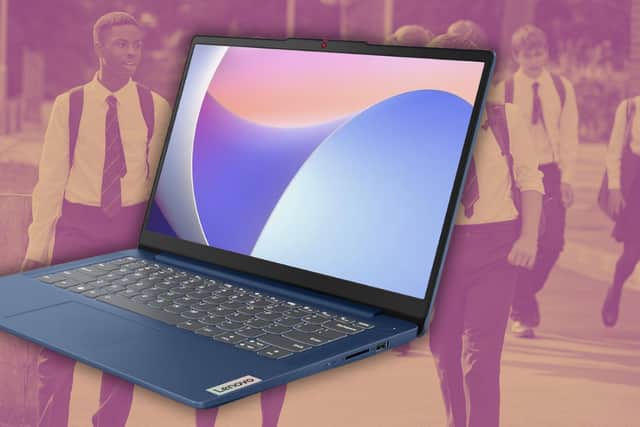
For most families, the Lenovo IdeaPad Slim 3 offers the best balance between price and performance.
At around £439, it includes specifications that comfortably exceed what most schools require:
- Intel Core i5-12450H processor
- 16GB RAM
- 512GB SSD
- 14-inch Full HD display
- Weight: 1.37kg
Students can easily run Microsoft Word, Excel, Teams, Google Classroom and multiple browser tabs without experiencing slowdowns. Rapid charging, Wi-Fi 6, USB-C connectivity and a webcam privacy shutter make it an excellent long-term choice.
Best for: Most GCSE and A-level students.
Best Chromebook: Acer Chromebook Plus 514
If your child's school primarily uses Google Classroom and browser-based software, a Chromebook can save well over £100 compared with a Windows laptop.
At approximately £327, the Acer Chromebook Plus 514 includes:
- Intel Core 5 processor
- 8GB RAM
- 512GB SSD
- 14-inch WUXGA display
ChromeOS boots quickly, updates automatically and is extremely easy to use. The taller WUXGA display also makes documents and web pages more comfortable to read.
Best for: Schools using Google Workspace.
Best premium Windows laptop: ASUS Zenbook 14 OLED UX3405CA
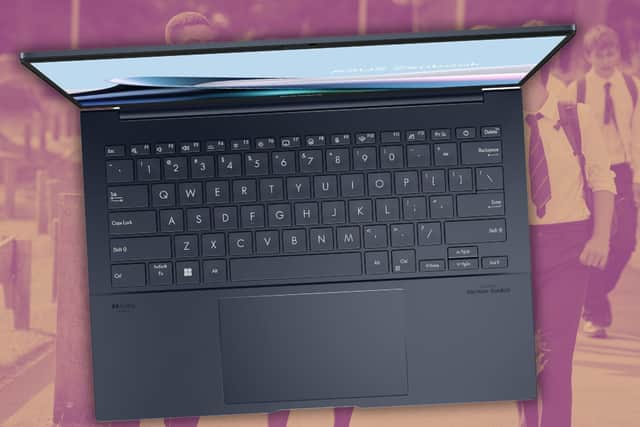
Parents looking for something more premium without paying MacBook prices should consider the ASUS Zenbook 14 OLED.
Priced around £699, it includes:
- Intel Core Ultra 5 processor
- 16GB RAM
- 512GB SSD
- 14-inch OLED display
- Weight: approximately 1.28kg
Its OLED screen delivers outstanding sharpness, contrast and colour accuracy, making long study sessions more comfortable. The premium aluminium build also means it's designed to withstand years of daily use.
Best for: Students studying Computer Science, Photography, Media or Design.
Best overall laptop: Apple MacBook Air M4
If you're buying one laptop to last throughout school and into university, the MacBook Air M4 remains the standout choice.
The recommended configuration includes:
- Apple M4 processor
- 16GB unified memory
- 256GB SSD
- 13.6-inch Liquid Retina display
- Weight: 1.24kg
The MacBook Air combines exceptional battery life, silent performance, a superb keyboard and one of the best trackpads available. Although it costs around £1,030, it's also the laptop most likely to remain fast and reliable for many years.
Best for: Students wanting a long-term investment.
How we chose these laptops
Rather than simply recommending the newest models, we compared laptops against the features that matter most for secondary school students.
We considered:
- Battery life
- Reliability
- Weight and portability
- Keyboard comfort
- Display quality
- Microsoft 365 performance
- Google Workspace performance
- Value for money
- Long-term durability
Common buying mistakes parents make
Gaming laptops are usually heavier, more expensive and have significantly shorter battery life than standard laptops. Most students simply don't need one.
While cheaper initially, 4GB RAM quickly becomes limiting once students have multiple browser tabs, Office applications and video lessons running.
A lighter 13- or 14-inch model is far easier to carry between lessons every day.
Frequently asked questions
Is 8GB RAM enough for GCSE students?
Yes. For Microsoft Office, Google Classroom, web browsing and coursework, 8GB is perfectly adequate. If your budget stretches further, 16GB provides better long-term value.
Is a Chromebook good enough for secondary school?
Yes, provided the school mainly uses Google Workspace or browser-based software. Always check before buying.
Is 256GB enough storage?
For most students, yes. However, a 512GB SSD provides extra space for coursework, projects and downloads over several years.
Can students use their own laptop in GCSE or A-level exams?
Usually not. Where students qualify for laptop use through exam access arrangements, schools generally provide managed devices.
How long should a school laptop last?
A good-quality laptop purchased at the start of Year 10 should comfortably last throughout GCSEs, sixth form and often into university.
The bottom line
You don't need to spend over £1,000 to buy a laptop that will see a student through secondary school. For most families, a lightweight laptop with at least 8GB of RAM, a fast SSD and reliable battery life will make a much bigger difference than paying for unnecessary processing power.
Our overall recommendation is the Lenovo IdeaPad Slim 3, thanks to its excellent specifications, portability and value for money. The Acer Chromebook Plus 514 is a superb alternative for schools using Google Classroom, while the ASUS Zenbook 14 OLED offers a premium Windows experience. If you're looking for a laptop that should still be performing brilliantly years from now, the Apple MacBook Air M4 remains hard to beat.

Selling every 20 seconds worldwide, SmilePro’s Advanced Whitening Kit is one of the fastest-growing alternatives to expensive dentist whitening. The dentist-developed system claims to deliver visibly whiter teeth in just 10 minutes and is currently available with 50% off.

Want 500 real Lotto lines for just £9? This exclusive deal from You Play We Play lets new customers join a managed National Lottery syndicate and play 500 lines across Wednesday and Saturday draws – all for 70% less than the usual price. You’ll be part of a 50-person group, sharing any winnings fairly while massively boosting your chances. And yes – these are official Lotto tickets, not bets, so every line supports UK good causes.